Working with Context API
- context api
- react
- next.js
- typescript
- apexchart
Before starting hands on, we’re going to explore concepts of context api, that’s very important to know when you should use and whats kind problems this solution has propose to solve. Then we’re going to start to configure and finally we’re going to applying in some amazing project.
I’ve selected a Investment simulator project to hands on with this following specification:
- Adding monthly investment
- Adding stocks
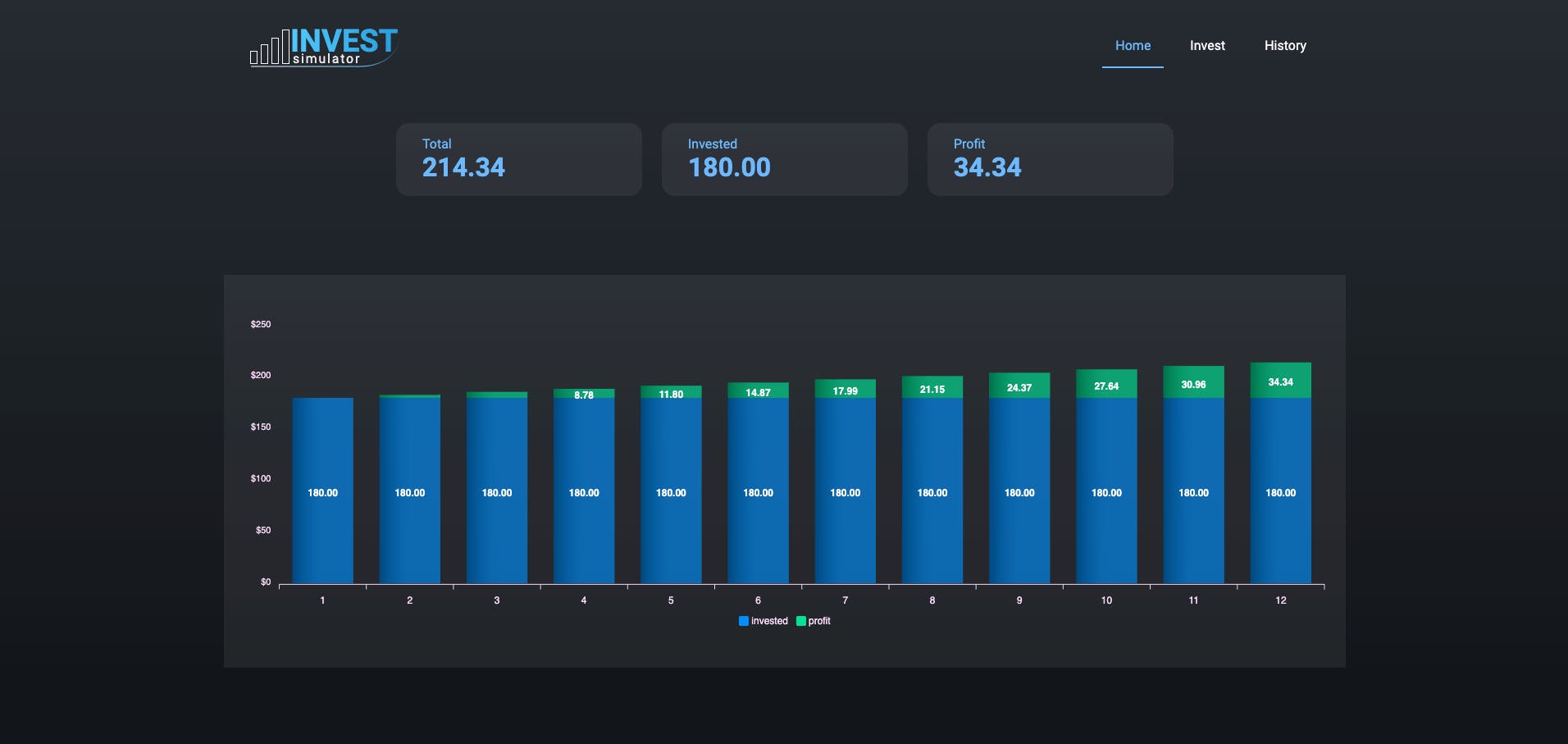
- Showing a graph with total invested and profit simulation
So, let's start our exploration?
Problem that Context solves
Usually in React applications you need to comunicate through components tree and context provide a way to pass informations without you pass props manually and keep parents components without unecessary properties.
If you want to need to have some “global” information in a three of components, this can be a good solution for you and avoid something like this
<Page user={user} avatarSize={avatarSize} />
// ... which renders ...
<PageLayout user={user} avatarSize={avatarSize} />
// ... which renders ...
<NavigationBar user={user} avatarSize={avatarSize} />
// ... which renders ...
<Link href={user.permalink}>
  <Avatar user={user} size={avatarSize} />
</Link>
In React documentation example, the context has been used to pass current selected theme information, probably is some ‘dark’ or ‘light’ mode, and this information is trigged in a button in some component and pass selected theme to all components of the application and each component can read this information and set the correctly style.
To configure de context you’ll need to follow this steps below:
- Create a Context object
- Create a Provider
- Put the provider in the tree that you need to share or set informations
In our examples, we’re going to use function components and creating some amazing projects using:
- Next.js
- Typescript
- Styled-components
let's start to create a next application and configure typescript, and to do that is simple, just run in your terminal
yarn create next-app context-api-sample
yarn add typescript
yarn add @types/react -D
Then change file extension from js to tsx (index.js and _app.js) and remove unnecessary files (styles folder, ...)
Let's start to create our sample context, We're going to create an context to create a player status control that we can change and watch the status in any component that we want inside this context ( src/contexts/PlayerContext.tsx)
import { createContext, ReactNode, useState, useContext } from 'react';
import { PlayerStatus } from '../interfaces/enums/PlayerStatus'

type PlayerContextData = {
  status: PlayerStatus;
  playPause: () => void;
}

const playerContext = createContext({} as PlayerContextData);


interface PlayerProviderProps {
  children: ReactNode
}


export function PlayerProvider({ children }: PlayerProviderProps) {

  const [status, setStatus] = useState<PlayerStatus>(PlayerStatus.stopped);


  const playPause = () => {
    setStatus(status === PlayerStatus.playing ? PlayerStatus.stopped : PlayerStatus.playing);
  }

  return (
    <playerContext.Provider value={{ status, playPause }}>
      {children}
    </playerContext.Provider>
  )
}


export function usePlayer() {
  const context = useContext(playerContext);
  return context;
}
src/interfaces/PlayerStatus.ts
export enum PlayerStatus {
  playing = 'playing',
  stopped = 'stopped'
}
To scope a context to all components, lets put in _app.tsx (you can scope as you need)
import { PlayerProvider } from "../contexts/PlayerContext"

function MyApp({ Component, pageProps }) {
  return (
    <PlayerProvider>
      <Component {...pageProps} />
    </PlayerProvider>
  )
}

export default MyApp
Finally, we can control calling our hook
import { usePlayer } from "../contexts/PlayerContext"

export default function Home() {
  const { playPause, status } = usePlayer();
  return (
    <>
      <h1>{status}</h1>
      <button onClick={playPause}> Change Player status</button>
    </>

  )
}I really have fun developing this project and you can navigate in Project Sample website.
Let's start brainstorming our project, to do that I'll use Figma, but to do not spend to much time, will just sketch our project with find the best color palete, correctly dimensions etc.
Creating the interface
We're going to use Stock type in lots of components, and to keep our application without repeat this time in each place that we use it, let's define in src/interfaces/Stock.ts
export interface Stock {
  code: string;
  month: number;
  price: number;
  amount: number;
  growthRate: number;
}
Creating the context
Now, let's create our context with totalProfit, totalInvested, stocks informations and with addStock function to add new stocks to the context.
src/contexts/investContext.tsx
import { createContext, ReactNode, useState, useContext, useEffect } from 'react';
import { Stock } from '../interfaces/Stock';

type InvestContextData = {
  totalProfit: number;
  totalInvested: number;
  stocks: Stock[];
  addStock: (stock: Stock) => void;
}

const investContext = createContext({} as InvestContextData);

interface PlayerProviderProps {
  children: ReactNode
}


export function InvestProvider({ children }: PlayerProviderProps) {

  const [totalInvested, setTotalInvested] = useState<number>(0);
  const [totalProfit, setTotalProfit] = useState<number>(0);
  const [stocks, setStocks] = useState<Stock[]>([]);


  function addStock(stock: Stock) {
    setStocks([...stocks, stock]);
    setTotalInvested(totalInvested + stock.amount * stock.price);
  }


  useEffect(() => {
    const totalInvested = stocks.reduce((acc, stock) => (acc + Number(stock.amount) * Number(stock.price)), 0);
    setTotalInvested(totalInvested);

    const totalProfit = stocks.reduce((acc, stock) => {
      const n = 12 - stock.month;
      const c = stock.amount * stock.price;
      const total = c * Math.pow((1 + stock.growthRate / 100), n);
      return acc + total;
    }, 0)

    setTotalProfit(totalProfit - totalInvested);
  }, [stocks])


  return (
    <investContext.Provider value={{ totalInvested, totalProfit, stocks, addStock }}>
      {children}
    </investContext.Provider>
  )
}


export function useInvest() {
  const context = useContext(investContext);
  return context;
}
Then. let's add our provider in _app.tsx, because. we want that all our application can access this context information
src/pages/_app.tsx
import { InvestProvider } from "../contexts/InvestContext"

function MyApp({ Component, pageProps }) {
  return (
    <InvestProvider>
      <Component {...pageProps} />
    </InvestProvider>
  )
}

export default MyApp
Adding styled-components and Roboto font
We're going to use CSS in Js to style our project, so lets start to install and configure then.
yarn add styled-components
yarn add @types/styled-components babel-plugin-styled-components -D
Then, lets create a babel file configuration in root directory
babel.config.js
module.exports = {
  presets: ['next/babel'],
  plugins: [["styled-components", { "ssr": true }]]
}
Now, we can create our global styles, to do that create a file src/styles/global.ts
import { createGlobalStyle } from 'styled-components';

export const GlobalStyle = createGlobalStyle`

  * {
    margin: 0;
    padding: 0;
    box-sizing: border-box;
  }

  body {
    background: linear-gradient(180deg, #272C34 0%, #111417 102.87%);
    font-family: 'Roboto', sans-serif;
    color: #fafafa;
    min-height: 100vh;
  }
`;
Finally, we're going to configure styled-component to render styles directly from server. That's important to avoid blinking styles during navigation because without this configuration our client need to process the styles script to convert to css and pass to babel to configure the code to browser, if you use this config, all of this process will be done in server side.
src/pages/_document.tsx
import Document, { Html, Head, Main, NextScript, DocumentContext, DocumentInitialProps } from 'next/document'
import { ServerStyleSheet } from 'styled-components';

export default class MyDocument extends Document {
  static async getInitialProps(ctx: DocumentContext) {
    const sheet = new ServerStyleSheet();
    const originalRenderPage = ctx.renderPage;
    try {
      ctx.renderPage = () =>
        originalRenderPage({
          enhanceApp: (App) => (props) =>
            sheet.collectStyles(<App {...props} />)
        })

      const initialProps = await Document.getInitialProps(ctx)
      return {
        ...initialProps,
        styles: (
          <>
            {initialProps.styles}
            {sheet.getStyleElement()}
          </>
        )
      }
    } finally {
      sheet.seal();
    }
  }
  render() {
    return (
      <Html>
        <Head>
          <link rel="preconnect" href="https://fonts.googleapis.com" />
          <link href="https://fonts.googleapis.com/css2?family=Poppins:wght@100;200;300;400;500;600;700;800;900&family=Roboto:wght@400;500;700;900&display=swap" rel="stylesheet" />
        </Head>
        <body>
          <Main />
          <NextScript />
        </body>
      </Html>
    )
  }
}
let's update our _app.tsx with our global styles
import { InvestProvider } from "../contexts/InvestContext"
import { GlobalStyle } from '../styles/global';

import { Header } from '../components/Header';

function MyApp({ Component, pageProps }) {
  return (
    <InvestProvider>
      <Header />
      <Component {...pageProps} />
      <GlobalStyle />
    </InvestProvider>
  )
}
export default MyApp
Creating Header component
NavLink component
src/components/NavLink/index.tsx
import Link from "next/link";
import { useRouter } from "next/router";

import * as S from './styles';

interface NavLinkProps {
  href: string;
  title: string;
}

export const NavLink = ({ href, title }: NavLinkProps) => {
  const { asPath } = useRouter();
  let active = asPath == href;
  if (asPath.startsWith(String(href)) && href !== '/') {
    active = true;
  }

  return (
    <S.Content active={active}>
      <Link href={href}>
        <a>{title}</a>
      </Link>
    </S.Content>
  )
}
src/components/NavLink/styles.ts
import styled, { css } from "styled-components";

type ContentProps = {
  active: boolean;
}
export const Content = styled.li<ContentProps>`
  ${({ active }) => css`
    padding: 1rem;
    border-bottom: ${active ? "2px solid var(--blue-500)" : ''};
    color: ${active ? "var(--blue-500)" : ''};
  `}
`
Nav component
src/components/Nav/index.tsx
import Link from "next/link"
import { NavLink } from "../NavLink";
import { Logo } from "../../illustration/Logo";

import * as S from './styles';

export const Nav = () => {

  return (
    <S.Container>
      <S.Content>
        <div>
          <Link href="/">
            <a>
              <Logo />
            </a>
          </Link>
        </div>
        <ul>
          <NavLink href="/" title="Home" />
          <NavLink href="/invest" title="Invest" />
          <NavLink href="/history" title="History" />
        </ul>
      </S.Content>
    </S.Container>
  )
}
src/components/Nav/styles.ts
import styled from "styled-components";

export const Container = styled.div``

export const Content = styled.nav`
  display: flex;
  align-items: center;
  justify-content: space-between;
  font-weight: lighter;

  ul {
    display: flex;
    li {
      & + li {
        margin-left: 1rem;
      }
    }

  }
`
ResumeItem component
src/components/ResumeItem/index.tsx
import * as S from './styles';

interface ResumeItemProps {
  title: string;
  value: string;
}


export const ResumeItem = ({ title, value }: ResumeItemProps) => {
  return (
    <S.Content>
      <p>{title}</p>
      <div>{value}</div>
    </S.Content>
  )
}
src/components/ResumeItem/styles.ts
import styled from 'styled-components';

export const Content = styled.li`
  border-radius: 1rem;
  padding: 1rem 2rem;
  background-color: #ffffff0f;
  color: var(--blue-500);
  p {

  }
  div {
    font-size: 2rem;
    font-weight: bold;
  }
`
Resume component
src/components/Resume/index.tsx
import { useInvest } from '../../contexts/InvestContext';
import { ResumeItem } from '../ResumeItem';

import * as S from './styles';

export const Resume = () => {
  const { totalInvested, totalProfit } = useInvest();


  return (
    <S.Container>
      <S.Content>
        <ul>
          <ResumeItem title='Total' value={String((totalInvested + totalProfit).toFixed(2))} />
          <ResumeItem title='Invested' value={String(totalInvested.toFixed(2))} />
          <ResumeItem title='Profit' value={String(totalProfit.toFixed(2))} />
          <ResumeItem title='%' value={totalInvested > 0 ? String(((totalProfit / totalInvested) * 100).toFixed(2)) + "%" : '0' + "%"} />
        </ul>
      </S.Content>
    </S.Container>

  )
}
src/components/Resume/styles.ts
import styled from 'styled-components';

export const Container = styled.div`
  padding: 4rem 0;
`

export const Content = styled.div`
  ul {
    display: flex;
    justify-content: center;
    li {
      max-width: 300px;
      width: 100%;

      & + li {
        margin-left: 1.5rem;
      }
    }
  }
`
Header component
src/components/Header/index.tsx
import { Nav } from '../Nav';
import { Resume } from '../Resume';

import * as S from './styles';

export const Header = () => {
  return (
    <S.Container>
      <S.Content>
        <Nav />
        <Resume />
      </S.Content>
    </S.Container>
  )
}
src/components/Header/styles.ts
import styled from "styled-components";


export const Container = styled.header`
  max-width: var(--max-content-width);
  margin: 0 auto;
`;

export const Content = styled.div`
  padding: 2rem;
`;
Create logo svg
src/illustration/Logo/index.tsx
export const Logo = () => (
  <svg width="184" height="55" viewBox="0 0 184 55" fill="none" xmlns="http://www.w3.org/2000/svg">
    <g id="logo">
      <text id="INVEST" fill="url(#paint0_linear_7_221)" xmlSpace="preserve" fontFamily="Roboto" fontSize="38.1176" fontWeight="bold" letterSpacing="0em"><tspan x="49" y="35.5285">INVEST</tspan></text>
      <text id="simulator" fill="#EEEEEE" xmlSpace="preserve" fontFamily="Roboto" fontSize="15.8824" fontWeight="300" letterSpacing="0.115em"><tspan x="52" y="49.9285">simulator</tspan></text>
      <g id="graph">
        <rect id="Rectangle 42" x="0.5" y="35.5" width="8" height="15" stroke="#FAFAFA" />
        <rect id="Rectangle 43" x="13.5" y="27.5" width="8" height="23" stroke="#FAFAFA" />
        <rect id="Rectangle 44" x="26.5" y="19.5" width="8" height="31" stroke="#FAFAFA" />
        <rect id="Rectangle 45" x="39.5" y="9.5" width="8" height="41" stroke="#FAFAFA" />
      </g>
      <path id="graph2" d="M183 3C187.5 52.5 142.5 54.8333 128 54H1" stroke="url(#paint1_linear_7_221)" strokeLinecap="round" />
    </g>
    <defs>
      <linearGradient id="paint0_linear_7_221" x1="49" y1="22.2353" x2="198.569" y2="22.2353" gradientUnits="userSpaceOnUse">
        <stop stopColor="#51C9FC" />
        <stop offset="1" stopColor="#1F97DA" />
      </linearGradient>
      <linearGradient id="paint1_linear_7_221" x1="186" y1="36.0002" x2="0.999905" y2="52.0002" gradientUnits="userSpaceOnUse">
        <stop stopColor="#4FC6FA" stopOpacity="0" />
        <stop offset="0.244792" stopColor="#64CDFB" />
        <stop offset="1" stopColor="white" />
      </linearGradient>
    </defs>
  </svg>
)
Create the project templates
I want to create a page layout separated and keep all files in pages folder with just responsible to control api calls, and to do that, lets create a folder templates and inside then let's create our layout.
Home template
Home page we're going to create an amazing chart using Apexcharts, lets install the library before continue
# terminal
yarn add apexcharts react-apexcharts
src/templates/Home/index.tsx
import dynamic from "next/dynamic"
import { useEffect, useState } from "react";
import { useInvest } from "../../contexts/InvestContext";

const Chart = dynamic(() => import('react-apexcharts'), {
  ssr: false
});

import * as S from './styles';


export const Home = () => {
  const { stocks } = useInvest();
  const [series, setSeries] = useState([]);

  useEffect(() => {

    let dataInvested = [0, 0, 0, 0, 0, 0, 0, 0, 0, 0, 0, 0];
    let dataProfit = [0, 0, 0, 0, 0, 0, 0, 0, 0, 0, 0, 0];


    dataInvested.forEach((_, index) => {
      const currentMonthCheck = index + 1;
      stocks.forEach((stock) => {
        console.log(stock.month);
        if (currentMonthCheck >= stock.month) {
          const totalInvested = stock.amount * stock.price;
          dataInvested[index] += totalInvested;
        }

      })
    })

    dataProfit.forEach((_, index) => {
      stocks.forEach((stock) => {
        const currentMonth = index + 1;
        const timeMonthDiff = currentMonth - stock.month;
        if (currentMonth <= 12 && currentMonth > stock.month) {
          const totalProfit = (stock.amount * stock.price) * Math.pow((1 + stock.growthRate / 100), timeMonthDiff) - stock.price;
          dataProfit[index] += Number(totalProfit.toFixed(2));
        }
      })
    })

    const seriesTemp = [
      {
        name: 'invested',
        data: dataInvested,
      },
      {
        name: 'profit',
        data: dataProfit
      }
    ]

    setSeries(seriesTemp);

  }, [stocks]);


  const options = {
    chart: {
      stacked: true,
      toolbar: {
        show: false
      },
      zoom: {
        enabled: false,
      },
      foreColor: '#fbdbfb',
    },
    grid: {
      show: false,
    },
    tooltip: {
      enabled: false
    },
    dataLabels: {
      enabled: true,
      formatter: (value) => { return value.toFixed(2) },

    },
    yaxis: {
      labels: {
        formatter: function (value) {
          return "$" + value.toFixed(0);
        }
      }
    },
    xaxis: {
      axisBorder: {
        color: '#fbdbfb'
      },
      accessTicks: {
        color: '#fbdbfb'
      },
      categories: [
        1,
        2,
        3,
        4,
        5,
        6,
        7,
        8,
        9,
        10,
        11,
        12,
      ]
    },
    fill: {
      opacity: 1,
      type: 'gradient',
      gradient: {
        shade: 'dark',
        opacityFrom: 1,
        opacityTo: 0.8
      }
    }
  };


  return (
    <S.Container>
      <S.Content>
        <Chart type="bar" height={400} options={options} series={series} />
      </S.Content>
    </S.Container>
  )
}
src/templates/Home/styles.ts
import styled from 'styled-components';


export const Container = styled.div`
  max-width: var(--max-content-width);
  margin: 0 auto;
`

export const Content = styled.div`
  padding: 2rem 1rem;
  background: #fafafa0f;

`
Invest template
src/templates/Invest/index.tsx
import { useEffect, useState } from 'react';

import { useInvest } from '../../contexts/InvestContext';

import * as S from './styles';

export const Invest = () => {
  const [code, setCode] = useState('');
  const [price, setPrice] = useState(0);
  const [amount, setAmount] = useState(1);
  const [growthRate, setGrowthRate] = useState(0);
  const [month, setMonth] = useState(1);

  const { addStock } = useInvest();

  const handleSubmit = (e) => {
    e.preventDefault();

    if (code && price && amount && growthRate && (month >= 1 && month <= 12)) {
      addStock({
        amount,
        code,
        growthRate,
        month,
        price
      })
    }
  }


  useEffect(() => {

    if (code) {
      switch (code) {
        case 'APPLE':
          setPrice(250);
          setGrowthRate(2.3);
          break;
        case 'GOOGLE':
          setPrice(180);
          setGrowthRate(1.6);
          break;
        case 'FACEBOOK':
          setPrice(60);
          setGrowthRate(2.8);
          break;
        case 'BERKSHIRE':
          setPrice(80);
          setGrowthRate(1.5);
          break;
        case 'AMAZON':
          setPrice(120);
          setGrowthRate(3);
          break;
        default:
          setPrice(0);
          setGrowthRate(0);
      }

    }
  }, [code]);

  return (
    <S.Container>
      <S.Content>
        <h1>Add stock</h1>
        <form onSubmit={handleSubmit}>

          <select id="codes" name="codes" onChange={(e) => setCode(e.target.value)} >
            <option value="SELECT">Select</option>
            <option value="APPLE">Apple</option>
            <option value="GOOGLE">Google</option>
            <option value="FACEBOOK">Facebook</option>
            <option value="BERKSHIRE">Berkshire</option>
            <option value="AMAZON">Amazon</option>
          </select>

          <label htmlFor="price">Price:</label>
          <input type="number" name="price" id="price" onChange={(e) => setPrice(Number(e.target.value))} value={price} placeholder="price" disabled />
          <label htmlFor="growthRate">Growth rate (per month):</label>
          <input type="number" name="growthRate" id="growthRate" onChange={(e) => setGrowthRate(Number(e.target.value))} value={growthRate} placeholder='average monthly growth (%)' disabled />
          <label htmlFor="month">Month:</label>
          <input type="number" name="month" id="month" onChange={(e) => setMonth(Number(e.target.value))} placeholder="month(1-12)" value={month} min={1} max={12} />
          <input type="submit" value="Add" />
        </form>
      </S.Content>
    </S.Container>
  )
}
src/templates/Invest/styles.ts
import styled from "styled-components";

export const Container = styled.div`
  max-width: var(--max-content-width);
  margin: 0 auto;
`;
export const Content = styled.div`
  padding: 2rem 1rem;
  background: #fafafa0f;
  border-radius: 1rem;
  display: flex;
  flex-direction: column;
  align-items: center;
  justify-content: center;

  h1 {
    margin-bottom: 1rem;
    font-size: 1rem;
  }

  form {
    display: flex;
    flex-direction: column;
    max-width: 300px;
    width: 100%;
    input[type=text],input[type=number], input[type=date] {
      height: 2rem;
      margin-bottom: 0.5rem;
      font-size: 1rem;
    }
    input[type=submit] {
      background: var(--blue-500);
      color: #fafafa;
      font-size: 1rem;
      font-weight: bold;
      font-size: 1rem;
      height: 2.5rem;
      border-radius: 0.2rem;
      margin-top: 1rem;
    }
    select {
      height: 2rem;
      font-size: 1rem;
    }
  }
`;
History template
src/templates/History/index.tsx
import { useInvest } from '../../contexts/InvestContext';

import * as S from './styles';

export const History = () => {
  const { stocks } = useInvest();

  return (
    <S.Container>
      <S.Content>
        <h1>History</h1>

        <table>
          <tr>
            <th>stock</th>
            <th>total</th>
            <th>month</th>
          </tr>
          {stocks.map((stock, index) => (
            <tr key={index}>
              <td>{stock.code}</td>
              <td>{stock.price * stock.amount}</td>
              <td>{stock.month}</td>
            </tr>
          ))}

        </table>

      </S.Content>
    </S.Container>
  )
}
src/templates/History/styles.ts
import styled from "styled-components";

export const Container = styled.div`
  max-width: var(--max-content-width);
  margin: 0 auto;
`;

export const Content = styled.div`
  padding: 2rem 1rem;
  background: #fafafa0f;
  border-radius: 1rem;
  display: flex;
  flex-direction: column;
  align-items: center;
  justify-content: center;

  h1 {
    margin-bottom: 1rem;
    font-size: 1rem;
  }

  table {
    tr{
      td, th {
        border-bottom: 1px solid #fafafa0f;
        padding: 0.5rem 1rem;
      }
      td {
        color: var(--blue-500)
      }
    }
  }
`;
Create pages
Now, we're just going to link our templates to our pages
src/pages/index.tsx
import { Home } from '../templates/Home';

export default function HomePage() {
  return <Home />
}
src/pages/invest.tsx
import { Invest } from "../templates/Invest";

export default function InvestPage() {
  return <Invest />
}
src/pages/history.tsx
import { History } from "../templates/history";

export default function HistoryPage() {
  return <History />
}
Running our application
We concluded and we can test our amazing application!
yarn dev
you can access in https://localhost.com:3000