gRPC with Node.js and Next.js to connect to a chat service
- node
- next.js
- grpc
- react
- typescript
- redis
Introduction
gRPC (Remote Procedure Call) is a framework maintained by Cloud Native Foundation (Same as Kubernetes), created to provide a simple and fast communication regardless of the language you use, basically.
Why I should use gRPC?
gRPC uses the most modern communication protocol (Http/2) and I'll explain some advantages over (REST/GRAPHQL that uses http1.1):
- Contracts with both parts (server-server, server-client), that ensure that all application know exactly data that can share.
- Different type of communication: unary(request-response, similar as rest), server-streaming, client-streaming and bidirecional streaming.
- Uses protocol buffers instead json, that works with binary files (consumes less space than JSON) that provide us a faster communication
Communication types
Because we use buffers to communicate, that allow us to use some modern features to communicate with parts.
Unary
The client send requests and server return responses, similar that we use in Rest.

Server Streaming
The client send a request and the server returns streaming responses

Client Streaming
The client sending informations to server and when the server get all informations returns a response
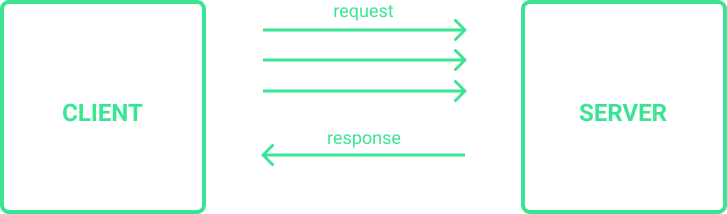
Bidirecional Streaming
The client and the server are both communicating with streaming
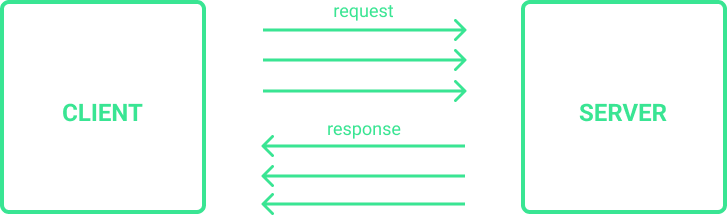
Rest vs gRPC
Rest
- Uses JSON to communicate between parts
- Unidirecional
- High latency
- No contracts
- No data streamings
- Default design: '/article/:slug', '/purchases'
gRPC
- Uses Protocol buffers to communicate between parts
- Bidirectional and Async
- Low latency
- With contracts
- Streaming support
- You are free to design your request
I believe I'll gave enough reasons to use gRPC in your projects, specially if you're working with micro-services.
Creating contract and configuring node backend and next.js frontend
Make sure that you have the protobuffers (protobuf, protoc-gen-grpc-web) contracts generators
# Installing using brew (MAC)
brew install protobuf
brew install protoc-gen-grpc-web

# Or, add in your project dependences
https://www.npmjs.com/package/protoc-gen-grpc-web
https://www.npmjs.com/package/protobufjs
And install dependence to work in your projects
Server
yarn add @grpc/grpc-js
yarn add @grpc/proto-loader
Web
yarn add google-protobuf
yarn add grpc-web
Contracts examples (file-name.proto)
Unary contract
syntax = "proto3";

package helloContractPackage;

message HelloRequest {
  string message = 1;
}

message HelloResponse {
  string message = 1;
}

service HelloService {
  rpc sayHello(HelloRequest) returns (HelloResponse);
}
Server Streaming contract
syntax = "proto3";

package numbersPackage;

message NumberRequest {
  int32 maxValue = 1;
}

message NumberResponse {
  int32 value = 1;
}

service NumbersService {
  rpc randomGenerate( NumberRequest) returns (stream NumberResponse){};
}
Client Streaming contract
syntax = "proto3";

package listPackage;

message TodoRequest {
  string todo = 1;
  string status = 2;
}

message TodoResponse {
  repeated TodoRequest todos = 1;
}

service List {
  rpc TodoList(stream TodoRequest) returns(TodoResponse){};
}
Bidirecional Streaming contract
syntax = "proto3";

package chatPackage;

message ChatRequest {
  string message = 1;
}

message ChatResponse {
  string username = 1;
  string message = 2;
}

service Chat {
  rpc Chat(stream ChatRequest) returns (stream ChatResponse);
}
Generating contract files in Server applications
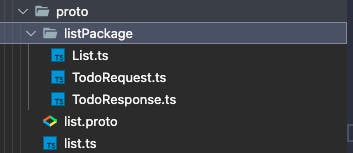
To generate contracts to work in server use the command below:
Sintax:
yarn proto-loader-gen-types --grpcLib=@grpc/grpc-js --outDir=CONTRACT_PATH_OUT CONTRACT_PATH/*.proto
for example
yarn proto-loader-gen-types --grpcLib=@grpc/grpc-js --outDir=src/chat-contract/ src/chat-contract/*.proto
The output will be something like this:
Generating contract files in Web applications (React, Next.js, ...)
Sintax:
protoc -I=. ./CONTRACT-PATH.proto \
  --js_out=import_style=commonjs:. \
  --grpc-web_out=import_style=typescript,mode=grpcwebtext:.
Example:
protoc -I=. ./src/chat-contract/chat-contract.proto \
  --js_out=import_style=commonjs:. \
  --grpc-web_out=import_style=typescript,mode=grpcwebtext:.
The output will be something like this:
Starting the gRPC server
Configuring the services, create a folder server.ts
In this case, we're just configure just a unary service (SayHello)
import path from "path";
import * as grpc from '@grpc/grpc-js';
import * as prootoLoader from '@grpc/proto-loader';
import { HelloHandlers } from './proto/helloPackage/Hello'

import { ProtoGrpcType } from './proto/hello';

const PROTO_FILE = './proto/hello.proto';

const packageDef = prootoLoader.loadSync(path.resolve(__dirname, PROTO_FILE));
const grpcObj = (grpc.loadPackageDefinition(packageDef) as unknown) as ProtoGrpcType;
const helloPackage = grpcObj.helloPackage;

function getServer() {
  const server = new grpc.Server()
  server.addService(helloPackage.Hello.service, {
    "SayHello": (req, res) => {
      console.log(req, res)
      res(null, { message: "Some response here" })
    }
  } as HelloHandlers)
  return server
}
Then, we can start our server
const PORT = 50051;
function main() {
  const server = getServer()

  server.bindAsync(`0.0.0.0:${PORT}`, grpc.ServerCredentials.createInsecure(), (err, port) => {
    if (err) {
      console.log('error:', err);
      return;
    }
    console.log("Server started on port ", PORT);
    server.start();
  })
}
main();
Example to configure other types of services
Server Streaming
function getServer() {
  const server = new grpc.Server()
  server.addService(
    randomPackage.Random.service, {
      RandomNumbers: (call) => {
        let maxValue = call.request.maxValue;
        if (!maxValue)
          maxValue = 0;

        let runCount = 0;
        const intervalId = setInterval(() => {
          runCount++;
          call.write({ value: Math.floor(Math.random() * maxValue!) })
          if (runCount >= 10) {
            clearInterval(intervalId)
            call.end();
          }
        }, 500)

      }
    } as RandomHandlers)
  return server
}
Client Streaming
function getServer() {
  const server = new grpc.Server()
  server.addService(
    listPackage.List.service, {
      TodoList: (call, callback) => {
        call.on("data", (chunk) => {
          console.log(chunk)
          todoList.push(chunk);
        });
        call.on("end", () => {
          callback(null, { todos: todoList })
        })
      }
    } as ListHandlers)

  return server
}
Bidirecional Streaming
function configServer() {
  const server = new grpc.Server()

  server.addService(
    chatPackage.Chat.service,
    {
      Chat: (call) => {
        call.on("data", (request) => {
          const username = call.metadata.get('username')[0] as string;
          const message = request.message;
          console.log(username, message);

          for (let [user, usersCall] of callObjByUsername) {
            if (username !== user) {
              usersCall.write({
                username,
                message
              })
            }
          }

          if (callObjByUsername.get(username) === undefined) {
            callObjByUsername.set(username, call);
          }
        });

        call.on("end", () => {
          const username = call.metadata.get('username')[0] as string;
          callObjByUsername.delete(username)
          call.write({
            username: "Server",
            message: `End message ${username}`
          })

          console.log(`${username} ended the chat session`);

          call.end();
        });
      }
    } as ChatHandlers);

  return server;
}
Using gRPC in Web Client
This is a bidirecional streaming in web client, to send a message to server, just create a client instance, prepare a message and then send,
because we're using streaming communication, lets configure an event (stream.on("data", ...) to listen
...
import { ChatServiceClient } from "../../contracts/chat-contract/Chat-contractServiceClientPb";
import { InitiateRequest, MessageRequest, Status, StreamMessage, StreamRequest, User, UserStreamResponse } from "../../contracts/chat-contract/chat-contract_pb"

export const ChatTemplate = (): JSX.Element => {
  const client = useRef<ChatServiceClient>();

  const handleUsernameSubmit = async (e) => {
    e.preventDefault();
    try {
      client.current = new ChatServiceClient(`http://localhost:8888`);
      req.setName(username);
      req.setAvatarUrl('no-avatar');

      client.current.chatInitiate(req, {}, (err, response) => {
        const { id } = response.toObject();

        setUser({
          id,
          name: username,
          avatarUrl: 'no-avatar',
          status: String(Status.ONLINE)
        })
      });
    } catch {}
  }

 useEffect(() => {
    ...
    (() => {
      const stream = client.current.userStream(req, {});
      stream.on("data", (chunk) => {
        const users = (chunk as UserStreamResponse).toObject().usersList;
        setUsers(users);
      })
    })();

  }, [user])
}
To use gRPC in client, you need to configure a server that implements http/2 requests, you can use envoy.
Configuring Envoy in Web. Application
Create docker-compose.yml in root directory
version: "3"
services:
  envoy:
    image: envoyproxy/envoy-dev:e4955aed5694f9935d674419dbb364e744f697b4
    volumes:
      - ./envoy.yaml:/etc/envoy/envoy.yaml
    ports:
      - "9901:9901"
      - "8080:8080"
  redis:
    image: bitnami/redis
    volumes:
      - ./redis:/bitnami/redis/data
    environment:
      - ALLOW_EMPTY_PASSWORD=yes
    ports:
      - "6379:6379"
create envoy.yaml in root directory
admin:
  access_log_path: /tmp/admin_access.log
  address:
    socket_address: { address: 0.0.0.0, port_value: 9901 }

static_resources:
  listeners:
    - name: listener_0
      address:
        socket_address: { address: 0.0.0.0, port_value: 8888 }
      filter_chains:
        - filters:
            - name: envoy.filters.network.http_connection_manager
              typed_config:
                "@type": type.googleapis.com/envoy.extensions.filters.network.http_connection_manager.v3.HttpConnectionManager
                codec_type: auto
                stat_prefix: ingress_http
                route_config:
                  name: local_route
                  virtual_hosts:
                    - name: local_service
                      domains: ["*"]
                      routes:
                        - match: { prefix: "/" }
                          route:
                            cluster: chat_service
                            timeout: 0s
                            max_stream_duration:
                              grpc_timeout_header_max: 0s
                      cors:
                        allow_origin_string_match:
                          - prefix: "*"
                        allow_methods: GET, PUT, DELETE, POST, OPTIONS
                        allow_headers: keep-alive,user-agent,cache-control,content-type,content-transfer-encoding,custom-header-1,x-accept-content-transfer-encoding,x-accept-response-streaming,x-user-agent,x-grpc-web,grpc-timeout
                        max_age: "1728000"
                        expose_headers: custom-header-1,grpc-status,grpc-message
                http_filters:
                  - name: envoy.filters.http.grpc_web
                  - name: envoy.filters.http.cors
                  - name: envoy.filters.http.router
  clusters:
    - name: chat_service
      connect_timeout: 0.25s
      type: logical_dns
      http2_protocol_options: {}
      lb_policy: round_robin
      load_assignment:
        cluster_name: chat_service
        endpoints:
          - lb_endpoints:
              - endpoint:
                  address:
                    socket_address:
                      address: host.docker.internal
                      port_value: 50501
Run the project
Start the server: go to a server path
yarn dev
Start Envoy container: go to a client path
docker-container up
Start the web client
yarn dev
Enjoy!
gRPC is a different approach than REST, but let us free to design our request
building...